Morrisette: A Vintage Font for Web Design
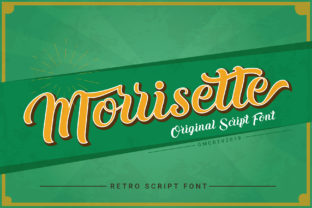
As a web designer, I'm always on the lookout for fonts that bring character to digital projects without sacrificing usability. Morrisette has quickly become one of my go-to choices for adding a retro flair to website headers, hero sections, and call-to-action buttons. Its bold, handwritten style feels both authentic and modern, making it perfect for creative brands looking to stand out.
Testing Morrisette in a Hero Section
I recently tested Morrisette on a boutique online store’s homepage. The font was used as the main headline over an image banner featuring handmade ceramics. The result was striking—Morrisette added a warm, artisanal feel that complemented the brand’s aesthetic. It didn’t overpower the background, and its natural swashes gave the text a handcrafted look that felt intentional rather than forced.
On desktop, the font rendered smoothly with clear letterforms, even at larger sizes. On mobile, it scaled well without losing its charm, though I noticed that some of the finer details in the script became slightly less distinct. That said, it still held up nicely for short phrases and headings.
Using Morrisette for Call-to-Action Buttons
Another area where Morrisette shines is in CTA buttons. I experimented with using it for a “Shop Now” button on a product landing page. The font’s boldness made the button visually prominent, while its vintage texture gave it a unique personality. It worked especially well when paired with a clean sans serif font for the subtext, creating a balanced contrast between the decorative and functional elements.
One thing to keep in mind is that Morrisette isn’t ideal for long body text. Its intricate strokes and flourishes can make it harder to read in dense paragraphs. But for short, impactful phrases—like headlines, buttons, or logos—it delivers a strong visual presence without compromising legibility.
Pairing Morrisette with Clean Typography
When working with Morrisette, I often pair it with a simple sans serif font like Montserrat or Open Sans. This combination creates a nice balance between the ornate script and the clean, modern look of the sans serif. It’s especially useful for landing pages where you need to maintain a professional tone while still standing out from the crowd.
For editorial-style websites, I’ve also found that pairing Morrisette with a serif font like Georgia or Playfair Display can create a more refined, classic feel. It works particularly well for blogs, portfolios, or content-heavy sites where a mix of styles can add visual interest without overwhelming the reader.
Considerations for Responsive Design
One of the key things to consider when using Morrisette on a website is how it performs across different screen sizes. While it looks great on large monitors, it can sometimes appear too small or lose detail on smaller devices. To counter this, I recommend increasing the font size slightly for mobile views and ensuring there’s enough spacing between lines to maintain readability.
It also performs best on light backgrounds. On dark themes, the contrast can be a bit harsh, so adjusting the color or adding a subtle shadow can help it stand out more naturally. Testing the font in various contexts is essential to ensure it aligns with your overall design goals.
Font Licensing and Web Use
Before implementing Morrisette on any website, it’s important to check the licensing terms. Most premium fonts come with webfont licenses that allow for use on sites, but it’s always good to verify that the license covers commercial use, especially if you’re working on client projects or e-commerce platforms.
Additionally, make sure the font includes all necessary file formats, such as WOFF and WOFF2, for optimal performance. Some fonts may not support multilingual characters, so double-check that it works for your target audience if you’re designing for international markets.
Final Thoughts on Morrisette for Web Projects
Morrisette is a versatile and stylish choice for web designers who want to add a touch of vintage flair to their layouts. Whether you're working on a creative portfolio, a boutique online store, or a course sales page, it brings a sense of authenticity and personality that can elevate your brand’s visual identity.
Its bold, handwritten style makes it ideal for headlines, buttons, and logos, but it’s best avoided for long blocks of text. With thoughtful pairing and proper sizing, Morrisette can be a powerful tool in your design toolkit, helping you create websites that are both beautiful and functional.